
Note: I’m based in Korea, so some context here is Korea-specific.
1. Private Registry is great, but it’s a hassle to manage!
Some people love the CLI, but I’m really bad at memorizing commands, so I prefer GUIs and visible records.
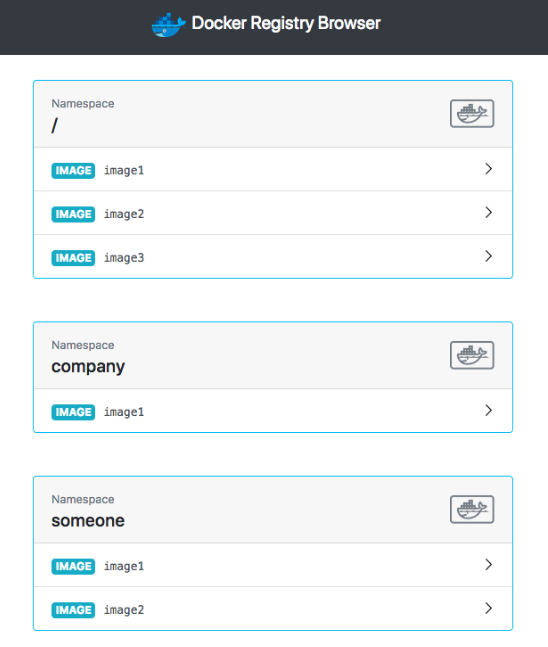
Docker Registry can be managed via CLI, but to make things a bit easier, I use docker-registry-browser .
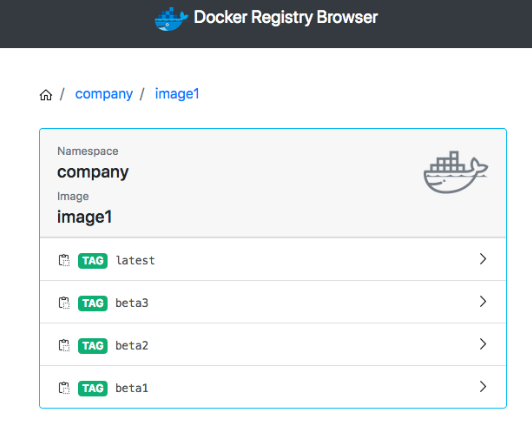
We’re going to set up a GUI that looks something like this.
2. Installation
We’ll install this alongside the existing docker-registry-system.
Add --- below the existing file content and then write the following.
modules/docker-registry-system/deployment.yaml
- existing deployment
apiVersion: apps/v1
kind: Deployment
metadata:
  name: docker-registry-ui-deployment
  namespace: docker-registry-system
spec:
  replicas: 1
  selector:
    matchLabels:
      app: docker-registry-ui-app
  template:
    metadata:
      labels:
        app: docker-registry-ui-app
    spec:
      nodeSelector:
        node-type: worker
      containers:
        - name: docker-registry-ui-pod
          image: klausmeyer/docker-registry-browser:1.7.0
          imagePullPolicy: Always
          ports:
            - name: http
              containerPort: 8080
          envFrom:
            - secretRef:
                name: docker-registry-ui-secrets-sealed-secrets
modules/docker-registry-system/service.yaml
... existing service
---
apiVersion: v1
kind: Service
metadata:
  name: docker-registry-ui-service
  namespace: docker-registry-system
spec:
  selector:
    app: docker-registry-ui-app
  type: ClusterIP
  ports:
    - name: http
      protocol: TCP
      port: 80
      targetPort: 8080
modules/docker-registry-system/ingress.yaml
---
apiVersion: traefik.containo.us/v1alpha1
kind: IngressRoute
metadata:
  name: docker-registry-ui-ingress
  namespace: docker-registry-system
spec:
  tls:
    certResolver: le
  routes:
    - kind: Rule
      match: Host(`URL to expose the UI on, e.g. docker-ui.lemon.com`)
      services:
        - name: docker-registry-ui-service
          port: 80
If you also want to set up Basic Auth, please refer to Secret Management with Sealed Secrets + Traefik Basic Auth Setup .
modules/docker-registry-system/sealed-docker-registry-ui-secrets.yaml
Go to the sealed secrets GUI and add the following Secrets. (Reference Docs Link )
- BASIC_AUTH_USER : the username used to log in to the registry
- BASIC_AUTH_PASSWORD : the password
- DOCKER_REGISTRY_URL : https://
- ENABLE_DELETE_IMAGES : true
- SECRET_KEY_BASE : the value produced by running
openssl rand -hex 64
apiVersion: bitnami.com/v1alpha1
kind: SealedSecret
metadata:
  name: docker-registry-ui-secrets
  namespace: docker-registry-system
  annotations: {}
spec:
  encryptedData:
    BASIC_AUTH_USER: afdfads...
    BASIC_AUTH_PASSWORD: fadvbads..
    DOCKER_REGISTRY_URL: dfd..
    ENABLE_DELETE_IMAGES: afdgd...
    SECRET_KEY_BASE: dffdf...
The usage is intuitive, so I recommend just trying it out yourself!
3. Registry GC
Even if you delete an image from the Docker Registry UI (or via the CLI), the disk space won’t be freed up immediately.
This is because when you delete an image from the GUI/CLI, no physical deletion actually happens; only the Manifest of that image gets removed.
The actual data deletion happens only when you explicitly run Registry GC.
I could go deeper into this, but today I’m focused on usage, so I’ll skip the details.
(If you’re more curious about this topic, I recommend first reading How Overlay FS Works and Union Mount Explained via the Transparent Cellophane Theory (Korean), and then searching with keywords like “Docker registry” and “image deletion”.)
- Running Registry GC
!! Caution! No Pull/Push should occur on the repository while GC is running. Please verify this before proceeding!
- Use
kubectl get pod -n docker-registry-systemto find the Registry’s Pod. - Run
kubectl exec -it pod/<registry-pod-name> -n docker-registry-system -- /bin/registry garbage-collect /etc/docker/registry/config.ymlto execute GC. - Then in the Longhorn Dashboard, select the Volume -> click Trim Filesystem to recalculate the Actual Size.
4. Wrapping up
We’ve now covered Docker UI and how to do GC.
Now that you have a Private Registry and a way to manage it, you can develop (?) your servers with peace of mind and drop in whatever you want!
Next time, we’ll look at how to run a database on top of Kubernetes using CloudNativePG.
Comments