Note: I’m based in Korea, so some context here is Korea-specific.
1. Forward Auth?
When we need authentication logic, where can we implement it?
The first thought that comes to mind is implementing it directly in the application.
But what if we have many applications? Or what if some applications were not built by us — they were built by someone else, and we cannot freely implement authentication logic in them?
We are using Kubernetes, and every request goes through Traefik once.
So, what if Traefik handled authentication logic "before forwarding the request"?
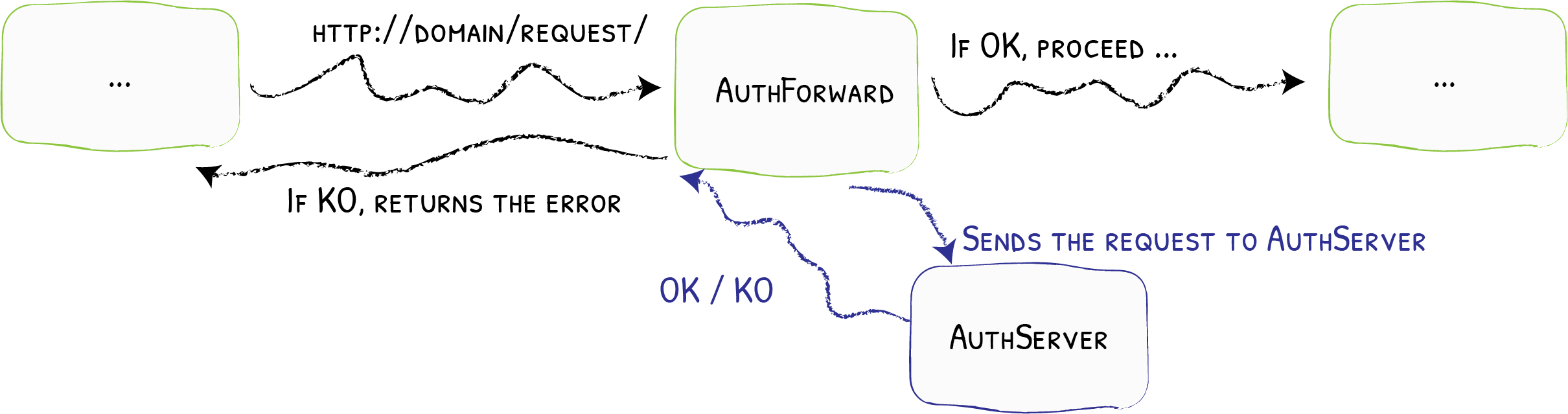
Simple!
- Every request passes through Traefik.
- If Forward Auth is configured, it sends the request to an external authentication service.
- The external authentication service does the following:
- If the request is valid, it returns a 2XX OK code. In this case, the request proceeds normally.
- If the request is not valid, it returns the authentication server’s response as-is. (Returns an error)
So how can we use this?
2. OAuth2, Cookies, and Forward Auth
2-1. The Simplest Forward Auth Server
Let’s think this through slowly from the beginning.
First, let’s think about the simplest Forward Auth server.
What do we need to do to allow some requests with OK and reject others with NO?
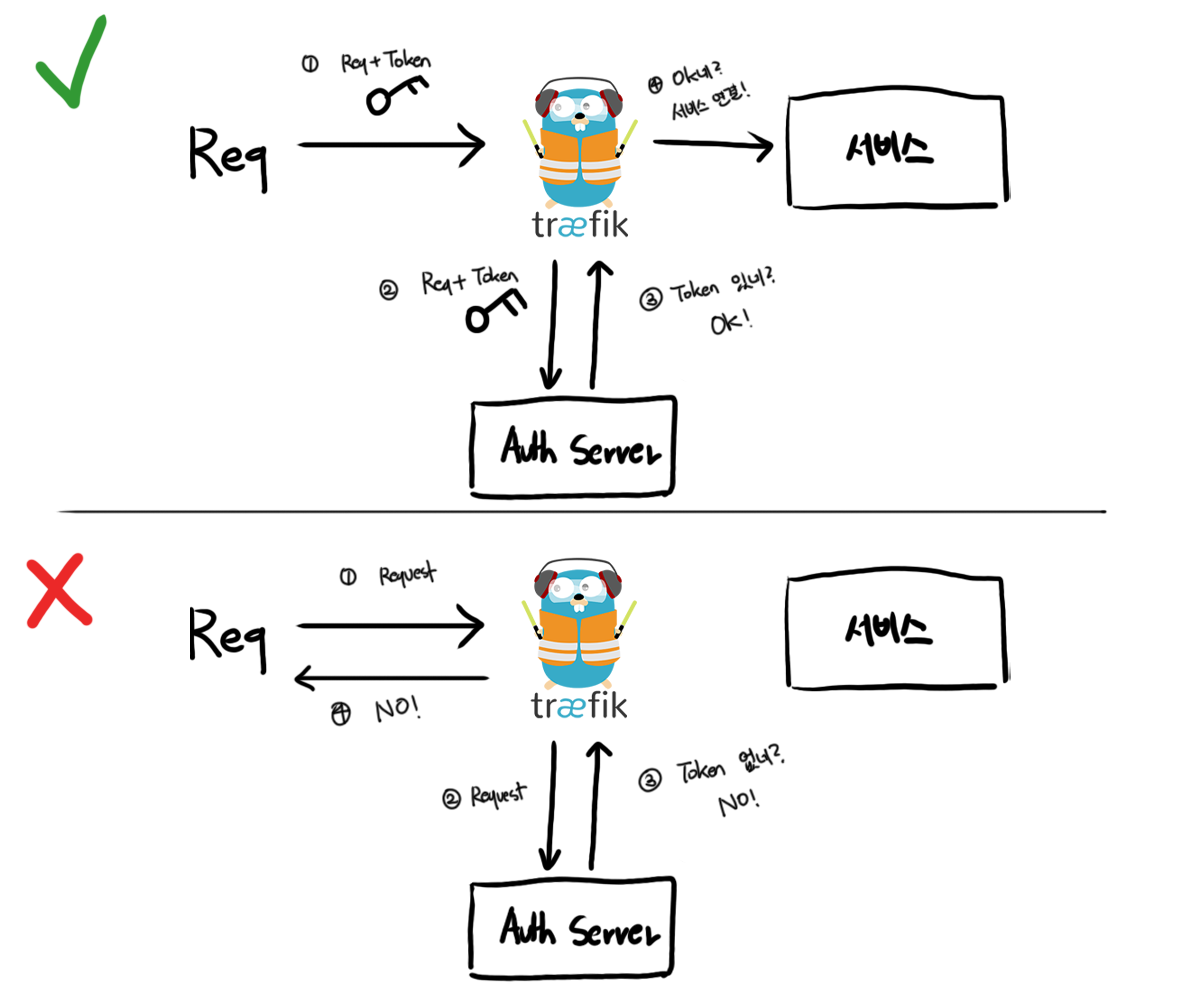
Right! Like we saw with Basic Auth, we send authentication info along with each request, and if that authentication info is valid, we let it pass.
In a diagram, the simplest example looks like this.
2-2. Where do we store the auth token?
Good!
We’ve thought about the simplest Forward Auth Server. The next question is, “When and where do we get the token?”
A simple approach would be creating a login page that issues a Token upon successful login.
Let’s draw it out.
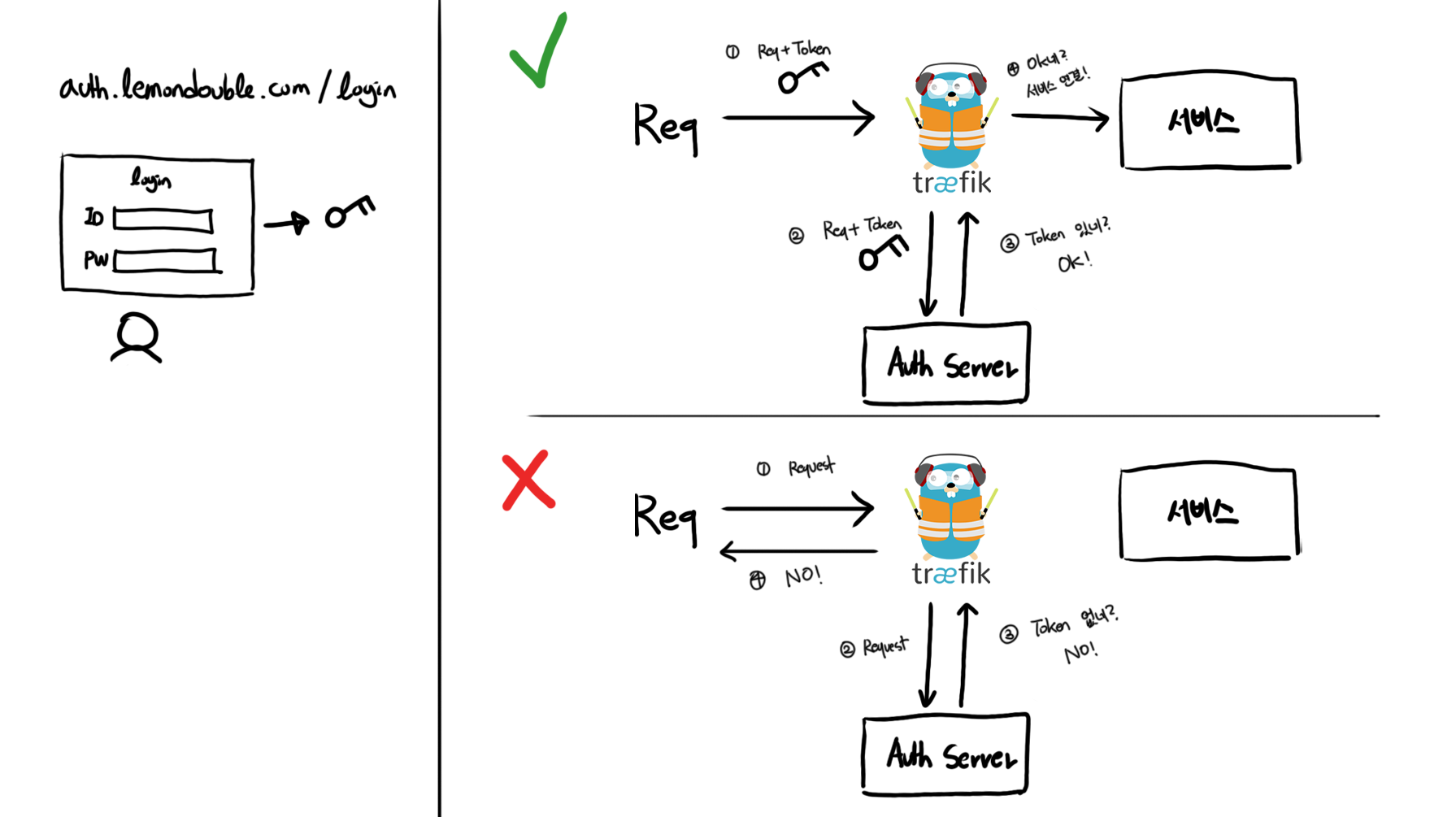
Hmm, but if we logged in at auth.lemondouble.com, how do we share the token? Where should we store it?
I also need to maintain the login on other sites like a.lemondouble.com, b.lemondouble.com using that token.
(Honestly, this happens quite often, but) if you’ve already done SSO login on a.lemondouble.com and then b.lemondouble.com makes you log in again, (even if user info is shared) it would be very annoying!
To solve this, we will store the token in a Cookie.
For example, if we set a Cookie on .lemondouble.com, that Cookie is automatically sent when accessing any subdomain — a.lemondouble.com, auth.lemondouble.com, 'b.lemondouble.com'. We use this property.
res.cookie('forward-auth-token', token, {
    domain: '.lemondouble.com',        //subdomain까지 공유하려면 앞에 "."을 붙여줘야함!
});
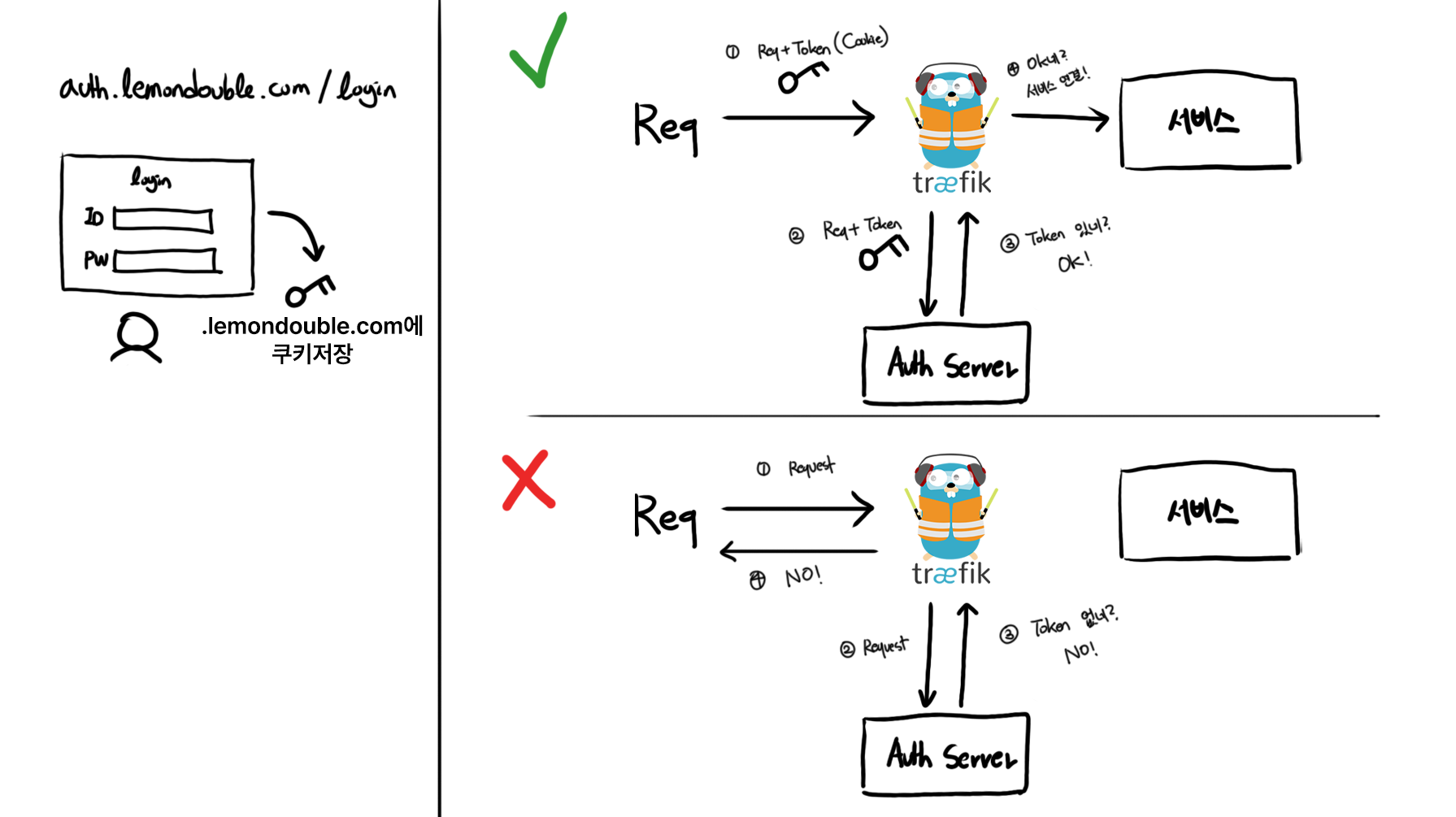
Then, many things become simple! Let’s summarize.
- Forward Auth allows the request if there is a token, rejects it if there is no token.
- Create a login page that, on successful login, sets a cookie on
.lemondouble.com.
Putting this all together gives us the following diagram.
2-3. Using JWT tokens, expiration, and validation
Now, what value should go inside the token?
In this case, JWT seems appropriate. A token that is stateless and very hard to forge fits this use case very well.
The contents… user ID or email would be good.
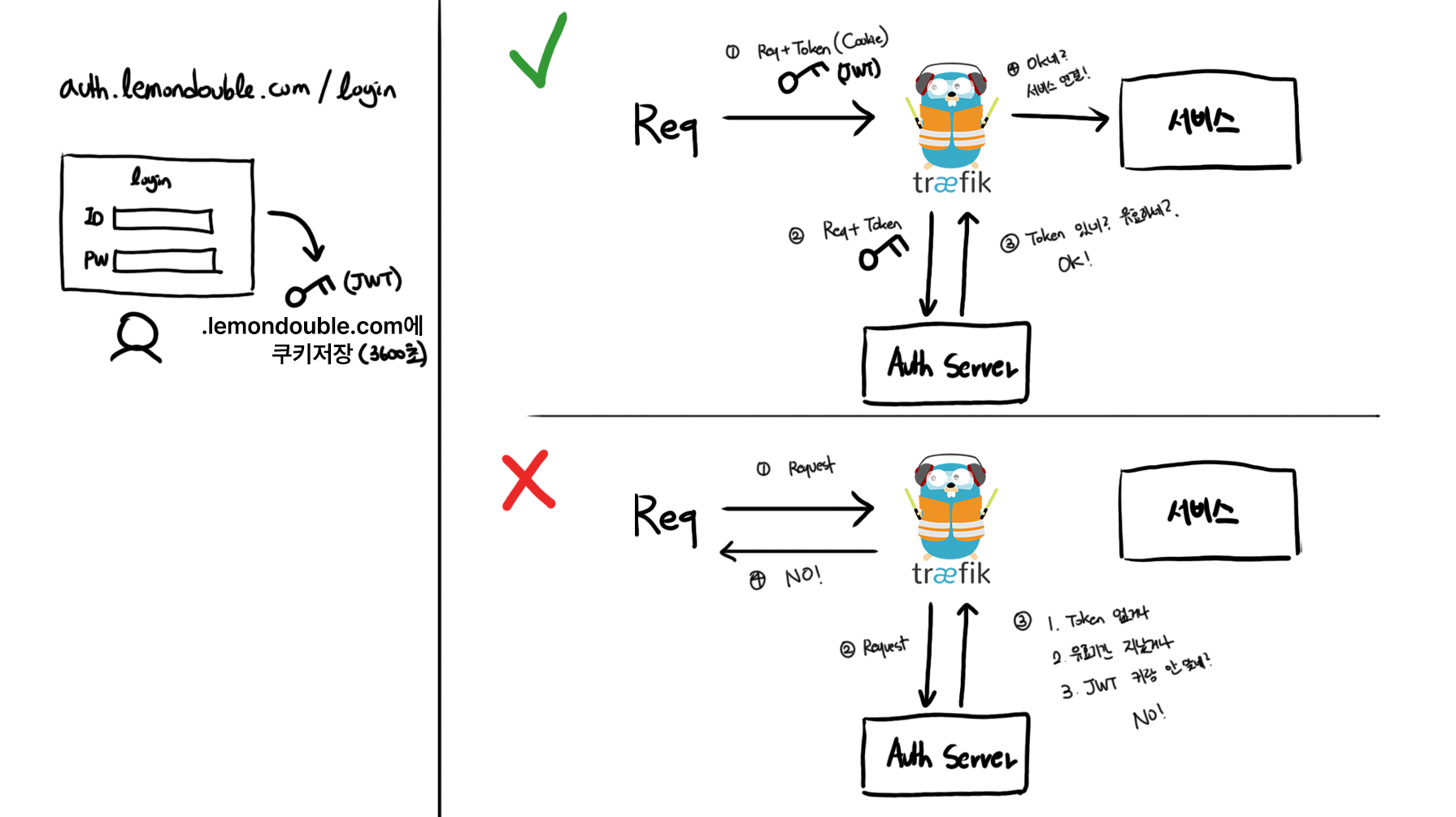
But once we issue a token, can we use it forever…? Then if a token is stolen once, the server is compromised forever…? So we need to set a token expiration. We can balance security and convenience — for convenience, let’s say I use 3600 seconds (1 hour).
Then
- The login server should issue JWT with Exp (Expired Time) set to current time + 3600 seconds. For convenience, let’s also unify the Cookie retention time to 3600 seconds.
- Previously Forward Auth let any token through, but we need to add JWT validation logic and reject expired tokens even if the value is valid.
Let’s draw it again.
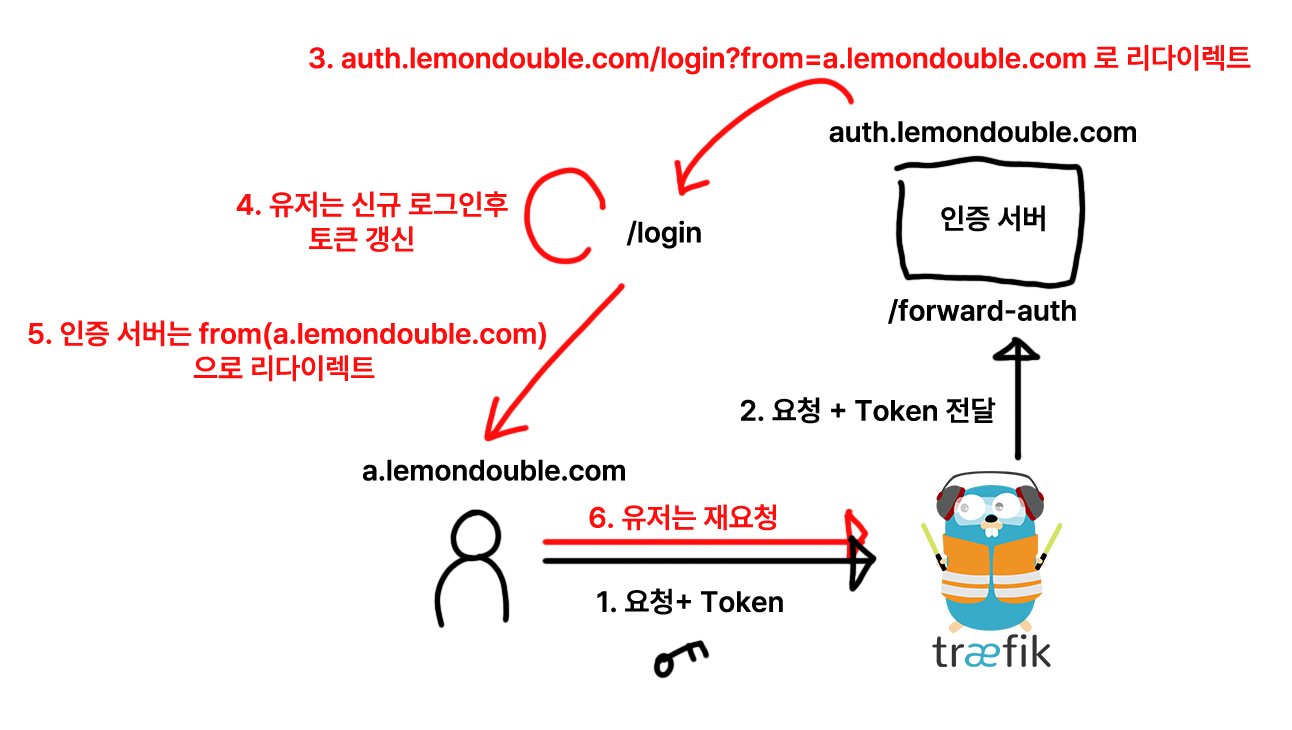
2-4. Handling redirects
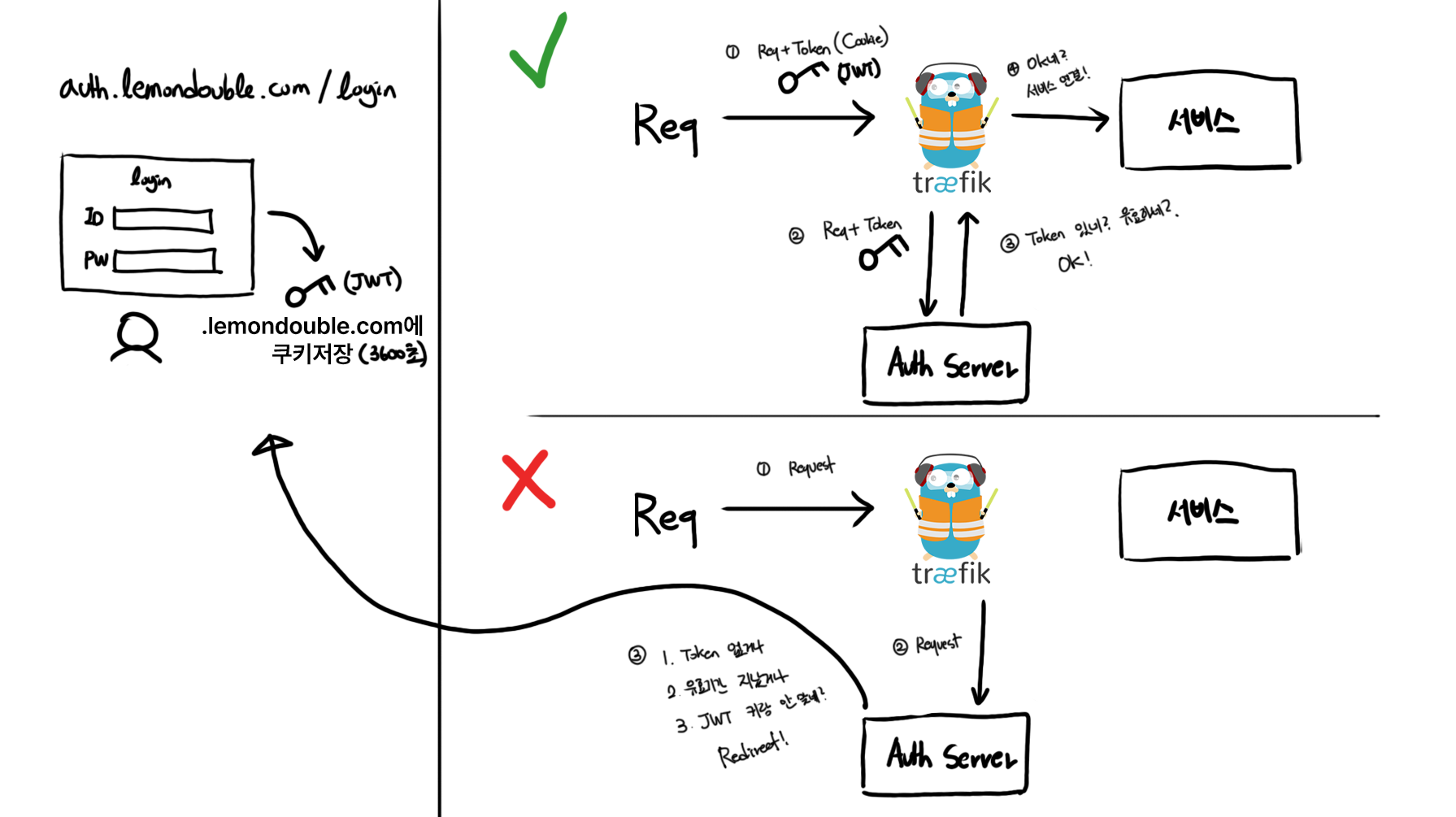
But if the token is invalid or missing, is it okay to just show an error page?
Of course… if I’m using it alone, what’s wrong with that… but it would be very annoying every time. It would be more convenient to automatically redirect to the login page on auth failure.
Let’s add it right away.
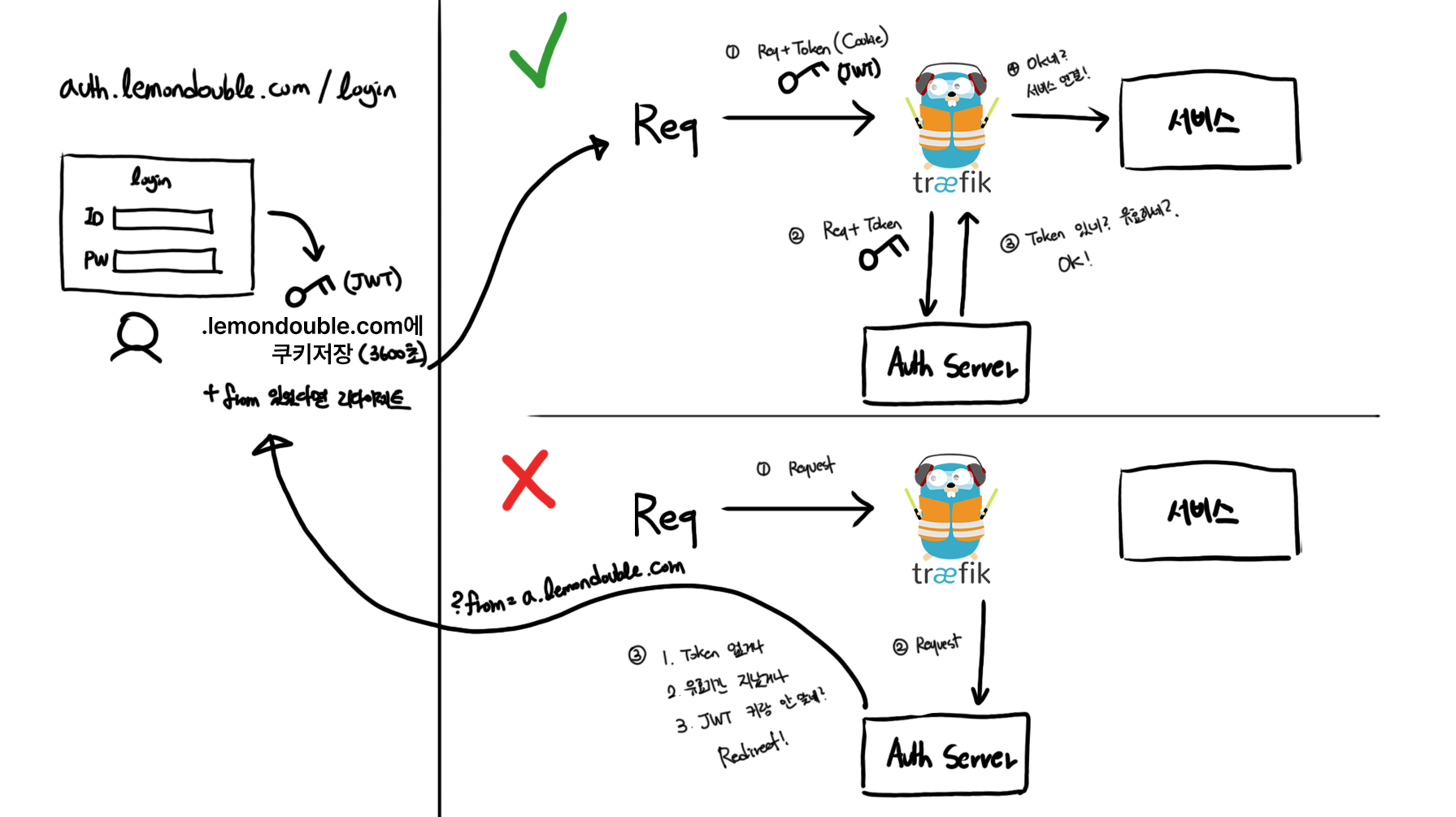
But usually after SSO success, we go back to the original site, right? Let’s add that too.
We can remember “where the user came from” via query parameters or headers, and on successful login, the login server can redirect based on that memory.
Ah… we haven’t even started OAuth and it’s already complicated. Let’s go one more step…
If integrated authentication is ID/Password login, we’re done here. To clear up some potential confusion, the login server and Traefik’s Forward Auth server can be the same.
The reason I’m rewriting this with diagrams is that there’s no need to separate the Forward Auth authentication server and the login server!
2-5. OAuth begins!
Let’s set the spec first.
The spec we will build is as follows.
- If you access a service that requires OAuth SSO, immediately move to the relevant Social Provider’s login page. (That is, we don’t make a login page!)
- On successful login, redirect to the originally requested service!
Basics like Client ID registration are omitted. Explaining each one would fill a book… If you don’t know the OAuth 2.0 protocol well, I recommend Live Coding’s Web2 - OAuth 2.0 lecture.1 (It’s free!)
2-6. Full OAuth flow
I… really tried hard to explain this simply… but honestly there’s no good way…
I’ll show you the full flow.
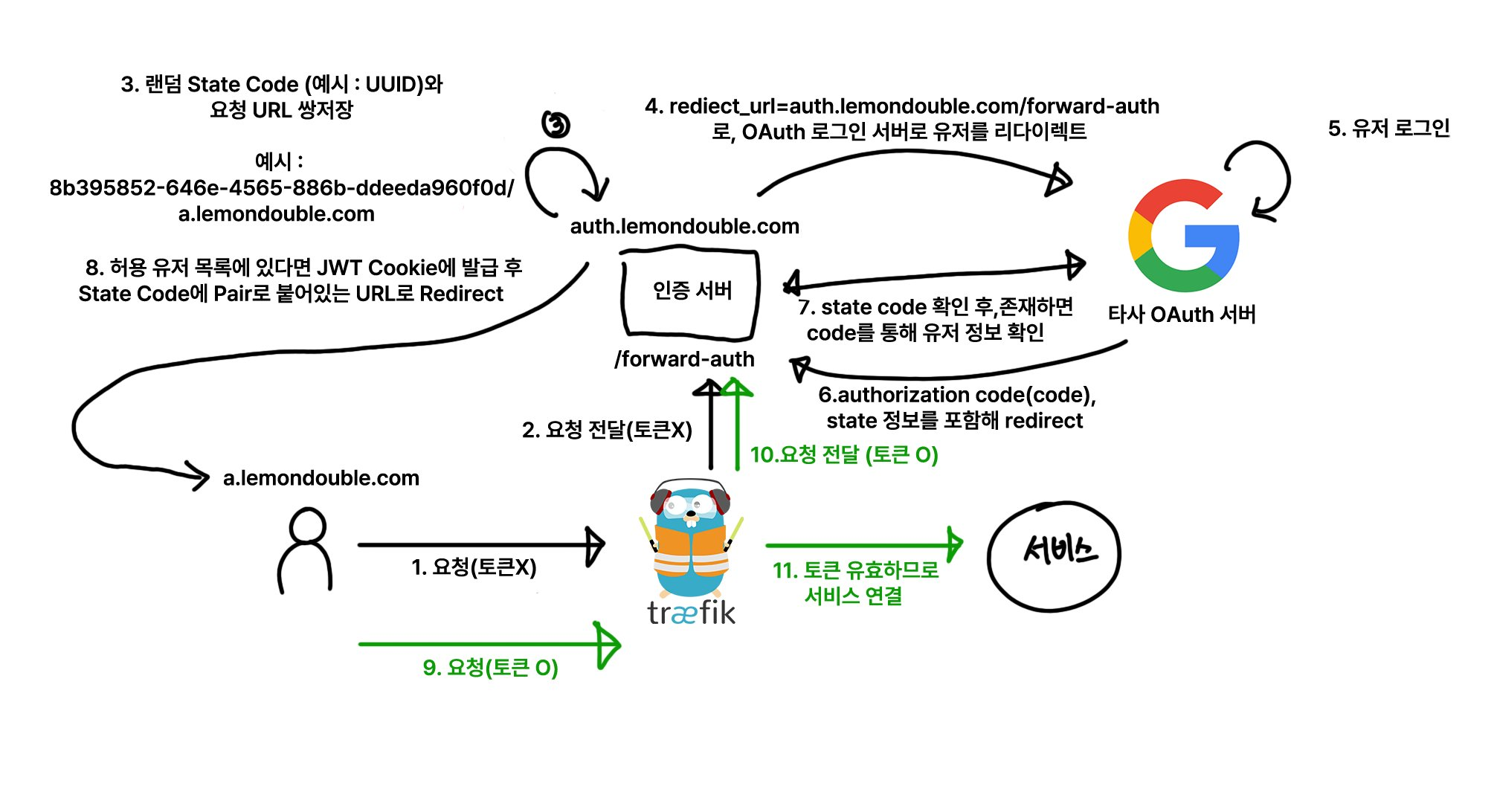
The core idea is using a State Code!
- When sending a request to the OAuth authentication server, you generate a random string and send it along (?state=randomstring), and after the user successfully logs in and returns, that string is sent back. This is in the OAuth 2.0 spec. (It’s not a required parameter, so you may not have noticed it while integrating OAuth!)
- We use this to record “where the user came from” in the database, and after successful login, redirect to that URL.
For the full flow, refer to the diagram above. So what does our authentication server need to implement?
We just implement a single endpoint with the following logic. (Process in order from above. The processing order matters!)
If query parameters have
codeandstate, check that the State Code matches the value stored in the DB. If the State Code exists in the DB, communicate with the third-party OAuth Server to convert the Authorization Code into user info. Check whether the converted user info is in the pre-registered permission list, and return an error if not. If it is in the permission list, generate a new login JWT and store it in a Cookie on.yourdomain.com. For security, it’s good to enable secure and httpOnly. Also set the sameSite option to'Lax'. Then redirect the user to the URI paired with the State Code.If there is a JWT token in the Cookie, validate the JWT and return 200 if valid.
If there is no JWT token in the Cookie at all, or the Cookie is expired, delete the expired Cookie and parse the
X-Forwarded-HostandX-Forwarded-Uriheaders to extract the current URI. Then store the new State Code and the URI pair in the DB, set the current API as the Redirect URL, and send it together with the State Code.
- TIP: The URI requested by the user:
https://" + GetHeader("X-Forwarded-Host") + GetHeader("X-Forwarded-Uri")
2-7. Additional Configuration
Lastly… add the following two lines to the Traefik configuration.
- "--entryPoints.web.forwardedHeaders.insecure"
- "--entryPoints.websecure.forwardedHeaders.insecure"
Without these lines, X-forwarded-for headers won’t be passed through!
If you’ve followed my blog post (4. Traefik HTTPS Authentication and ArgoCD Setup ), you can configure it like this.
# https://traefik.io/blog/https-on-kubernetes-using-traefik-proxy/
apiVersion: helm.cattle.io/v1
kind: HelmChartConfig
metadata:
  name: traefik
  namespace: kube-system
spec:
  valuesContent: |-
    ports:
      web:
        redirectTo:
          port: websecure
          priority: 10
    additionalArguments:
      - "--log.level=INFO"
      - "--certificatesresolvers.le.acme.email=yourMail@gmail.com"
      - "--certificatesresolvers.le.acme.storage=/data/acme.json"
      - "--certificatesresolvers.le.acme.tlschallenge=true"
      - "--certificatesresolvers.le.acme.caServer=https://acme-v02.api.letsencrypt.org/directory"
      - "--entryPoints.web.forwardedHeaders.insecure"
      - "--entryPoints.websecure.forwardedHeaders.insecure"
After that, run kubectl apply to finalize the Forward Auth configuration!
Conclusion
Honestly, the content is so vast… I tried to write it as easily as possible, but I’m not sure it was conveyed properly. I think I might need to revise this post later.
Just in case, if anyone is trying to follow this and build it, please feel free to leave a comment below or contact me at contact@lemondouble.com if there are parts you don’t understand! I’ll help with troubleshooting too.
Oh, and if you know Golang, you might also want to look at traefik-forward-auth .
Live Coding (생활코딩) is a popular Korean online learning platform that offers free programming courses, primarily in Korean. ↩︎
Comments