
Note: I’m based in Korea, so some context here is Korea-specific.

A story about building a service like this!
Added 2024.06.30: Back then, ChatGPT didn’t exist yet, so chatbot services like this were not common!
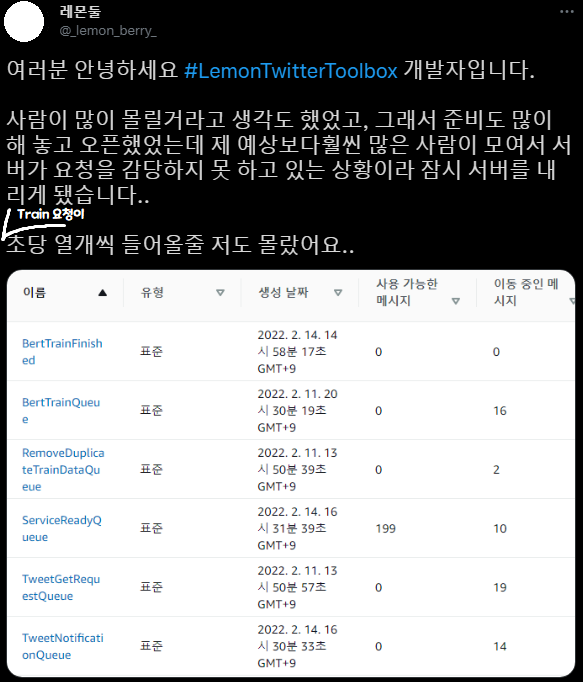
Aaaah what on earth is happening!!
1. Why did I develop this?
I originally wrote something long, but other people’s TMI isn’t very fun, so I’m keeping it short. Even shortened, it’s still pretty long though!
While reading Introduction to Natural Language Processing with Deep Learning as a hobby, I was on the Korean chatbot using BERT sentence embedding section when it suddenly hit me — couldn’t I use tweets as training data?
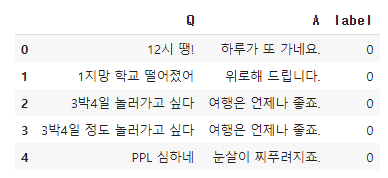
Hey, couldn’t I do something similar with Twitter mentions?

Couldn’t I make it like this?
The problem is the amount of training data. The Twitter API only provides up to 3,200 tweets when requesting recent tweets.
Conservatively, if we assume half of those are public tweets (tweets thrown out into the void), that’s about 1,600 tweets as training data. As you know, 1,600 entries is a very small amount of data in machine learning, making it hard to build a meaningful chatbot.
But if it looks fun, isn’t it worth a shot?
So I decided to give it a try. Ah… at the time I had no idea I’d burn over a month turning roughly 200 lines of Colab code into a real service…
2. Serverless ML?
The very, very simple structure for generating ML-transformed data is as follows.
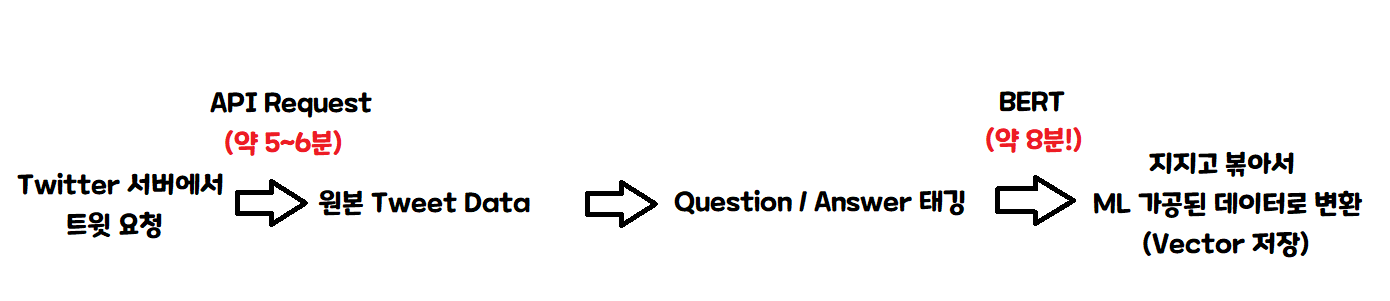
So, with a single server processing one at a time, it takes about 15 minutes per person!
That’s roughly 4 people per hour! 100 people = 25 hours, 1,000 people = 250 hours, so…
If you sign up today, it’ll be done 10 days later!
And this is excluding the chatbot Q&A part!
Ah… this is a bit… I’ll have to think of another way…
Oh! Now that I think about it, a serverless architecture would be a good fit. For those unfamiliar with serverless, let me explain briefly with a diagram.
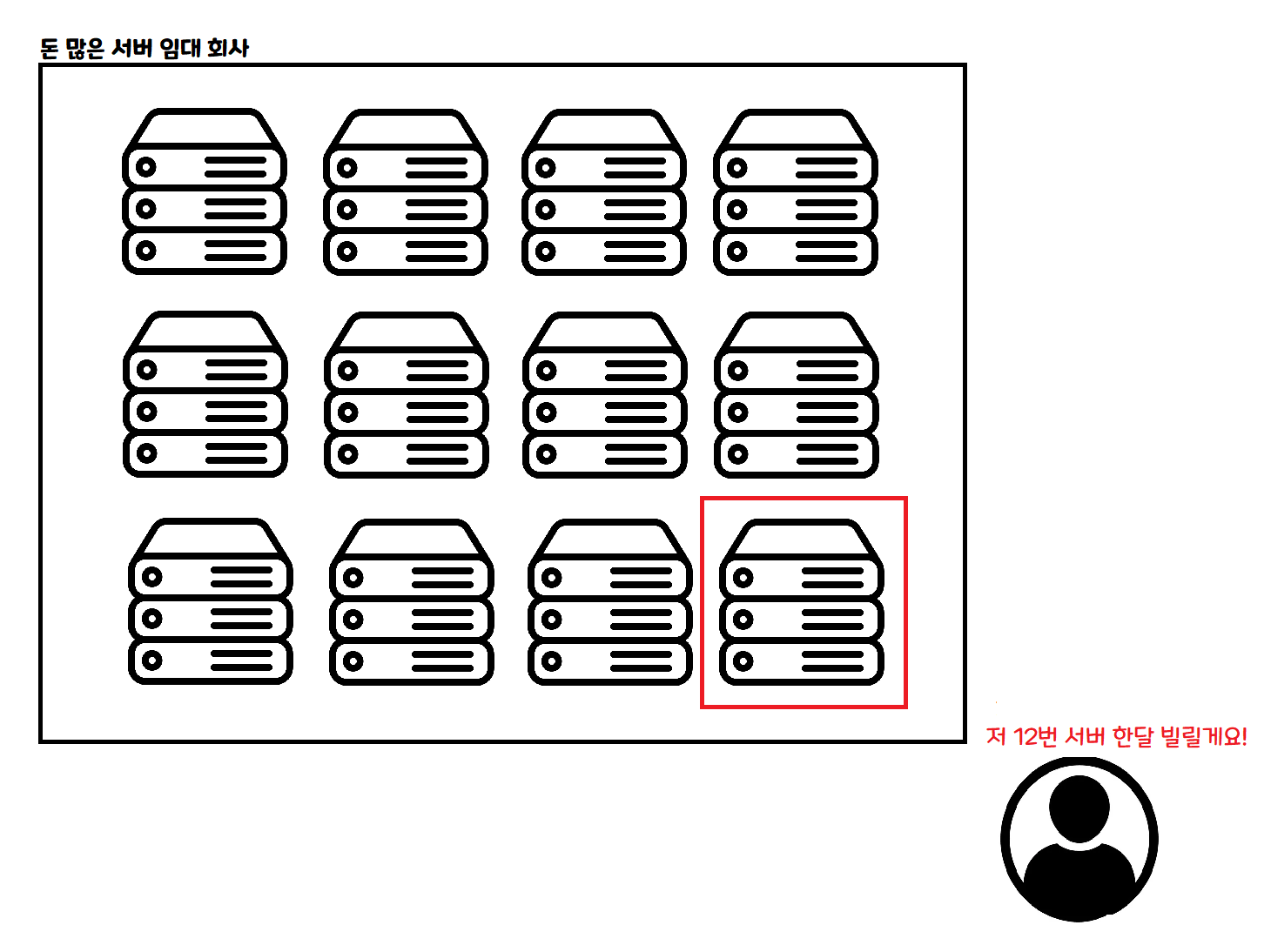
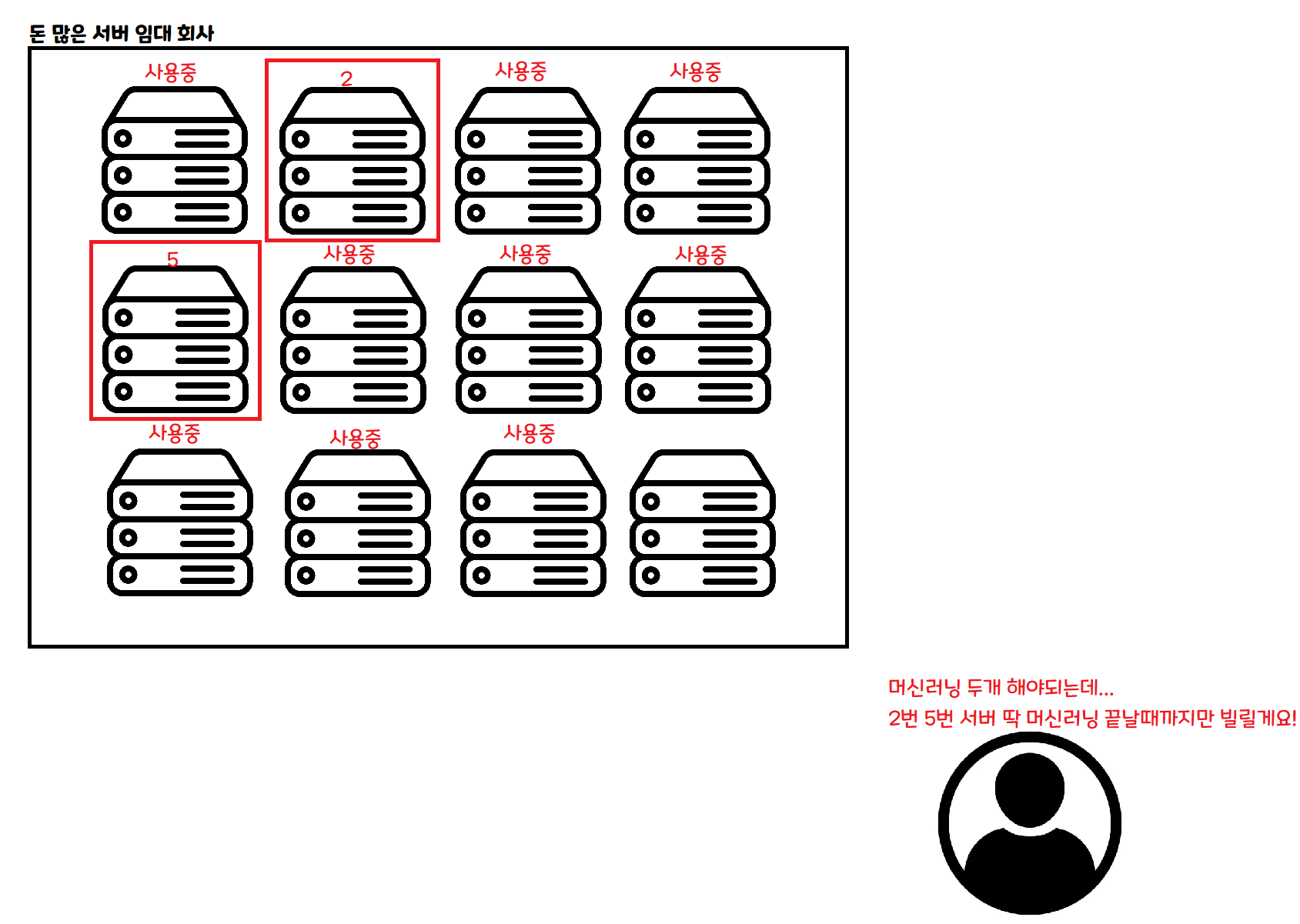
This is the traditional way of using the cloud. You rent a computer for a fixed period — a month, a week, a day — and pay for the time you rented. VPS is a similar concept!
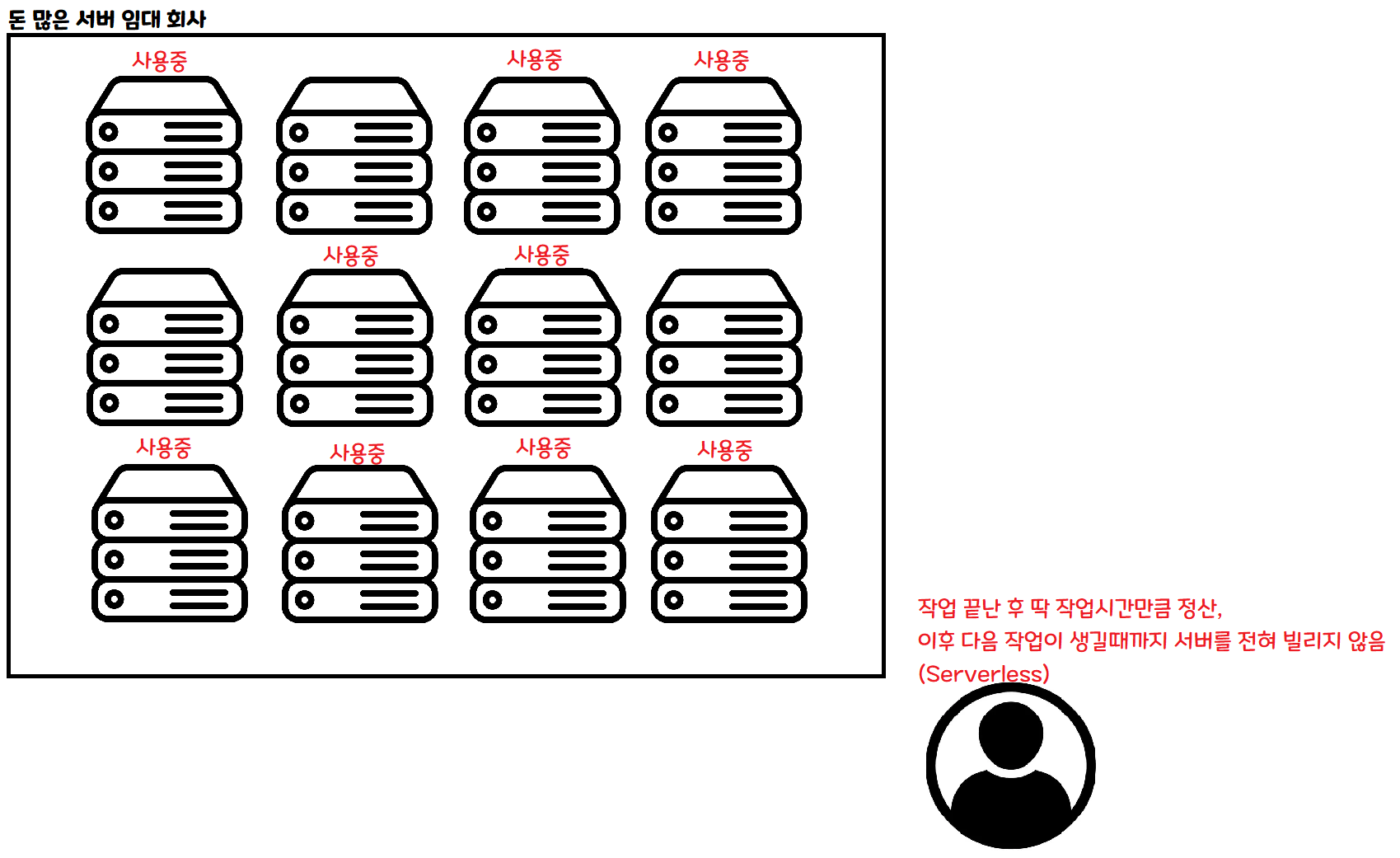
This is the serverless approach. When you need to do some work, you request only as much as you need, and rent only until that work is done.
If 100 people come in at the same time, you can rent 100 servers simultaneously to handle them. If no one comes in, you don’t need to rent any servers during that time.
With this kind of architecture, in theory, no matter how many people show up, you can process data at the same speed as if only one person showed up! Of course, in practice there are other issues.
Ah! Problem solved! Let’s give it a shot!
3. Reality is not so easy
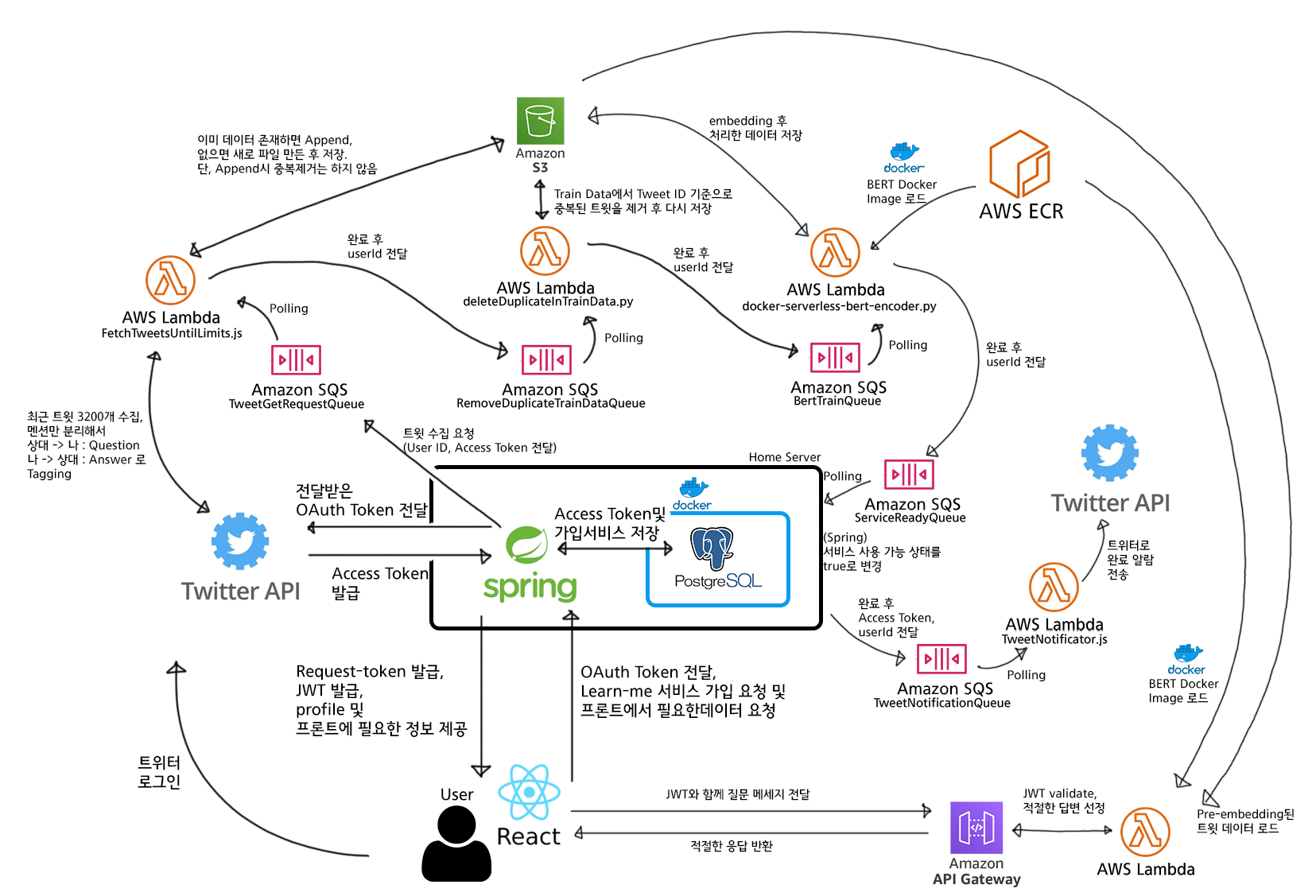
I thought I had a rough idea of how to do this, but…
Ah…. Your head is suddenly hurting too, right? If we simplify this very, very much, it looks like this.
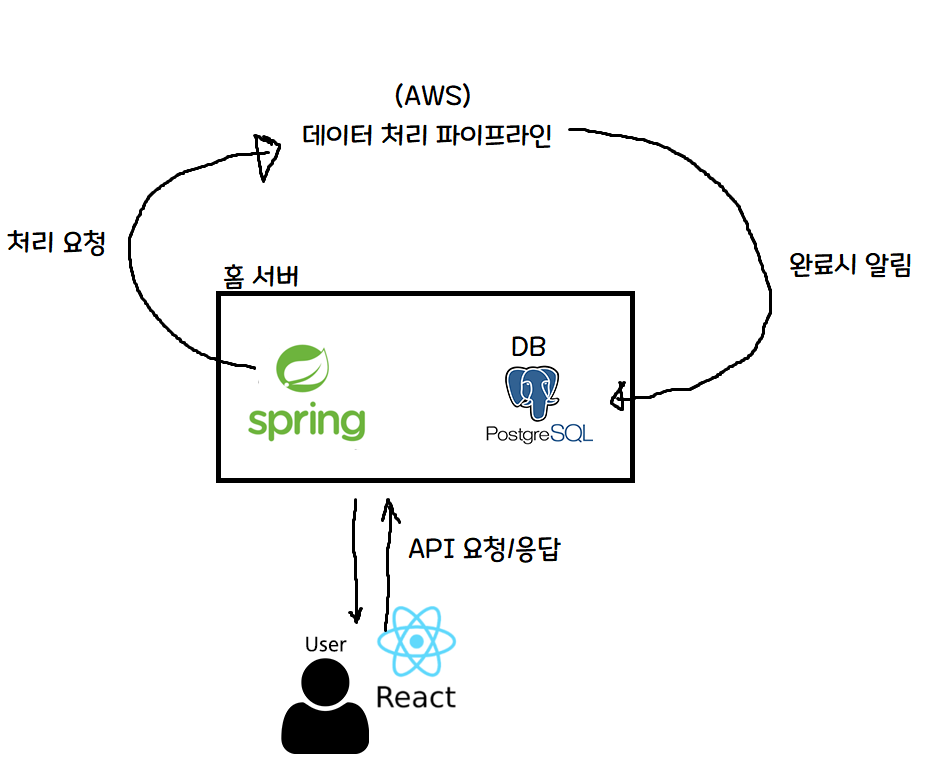
Ah, this is a bit easier to understand!
The key parts are as follows.
- To save server costs, the home server’s Spring server only handles things like signup / auth token issuance.
- Heavy computations like machine learning are sent to the cloud (AWS) and processed using AWS server resources.
- When AWS finishes processing, it notifies the home server, which records completion in the DB.
Since I personally have a home server, I built the service with the dream and hope of catching both cost-effectiveness and performance — letting the home server handle light tasks to save on server rental fees, and offloading heavy computation to the cloud (AWS)!
4. Launch — Subtitle: Bottlenecks emerge from where you least expect

I’m sorry… I mean… the plan was clearly perfect…
Naturally, I assumed the bottleneck of this project would be the machine learning part, and I designed the entire system accordingly. But surprisingly… that wasn’t the case.
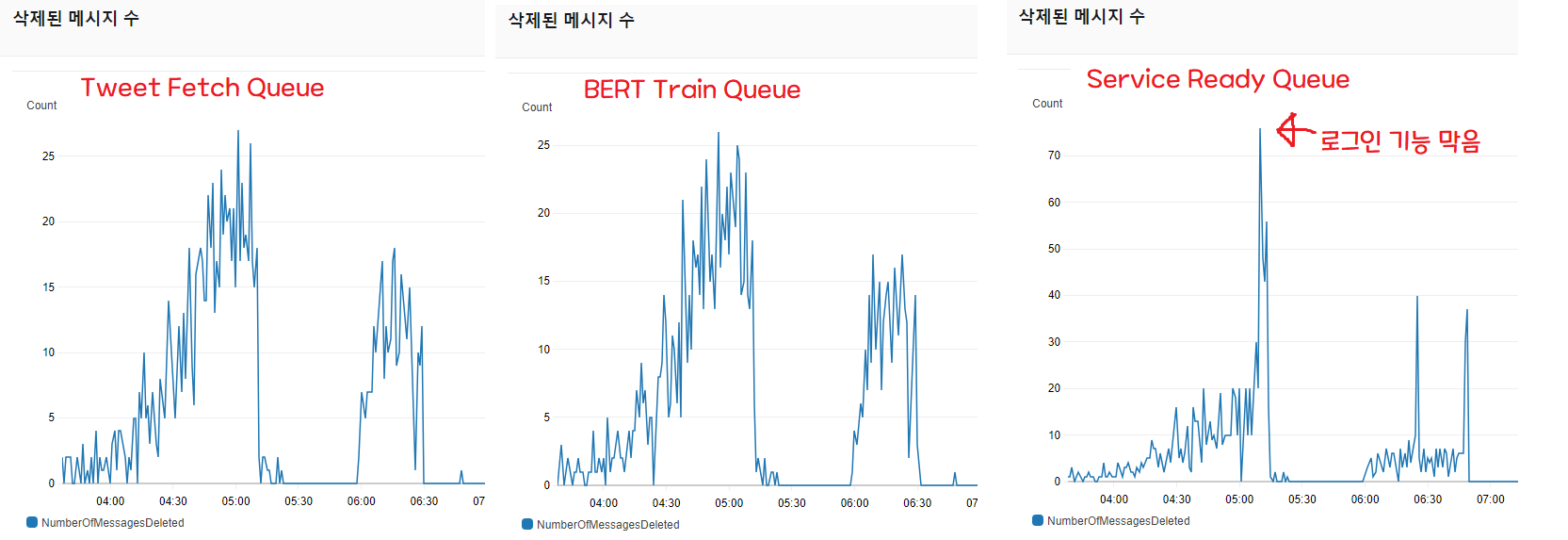
The “messages deleted” count is a metric that lets you gauge throughput. When requests come in as messages, it shows how many requests were processed and deleted (as messages) per minute.
As you can see, the script that scrapes 3,200 tweets and the queue that handles BERT machine learning processing move in tandem and absorbed all the requests (graphs 1 and 2).
But the queue (3) that, on completion of all pipeline tasks, notifies Spring and updates the DB’s “available” field to true is failing to keep up with the throughput.
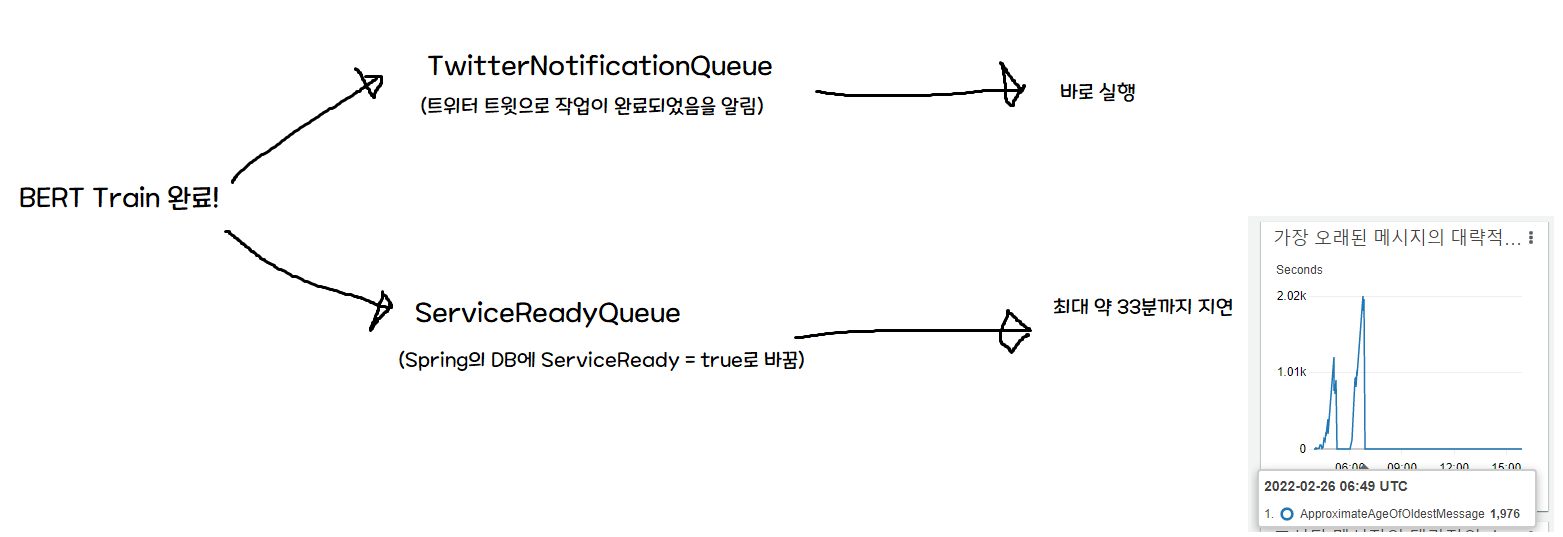
The problem is that the initial architecture assumed ServiceReadyQueue would be processed instantly.
So when training completes, both the Twitter notification (serverless) and the Spring notification fire simultaneously — but the Twitter notification arrives immediately, while the DB write is delayed. In other words, a user who clicks the notification could see a “Service unavailable!” screen for up to 33 minutes.
Honestly, I agonized over this for a while.
Ahh… this is a level of traffic I’ll never see again in my life… do I have to… block logins…? With a 30-minute backlog?
Since Spring consumes 10 messages per minute, the bottleneck would resolve itself if fewer than one user signed up every 6 seconds. But monitoring showed no sign of slowing down, so I decided to block logins for now.
The criterion was clear: delayed processing is okay, but the service being unusable when it says it’s ready is a critical defect.
So I quickly modified the React project to remove the login and signup buttons, and hastily revised the pipeline as follows.
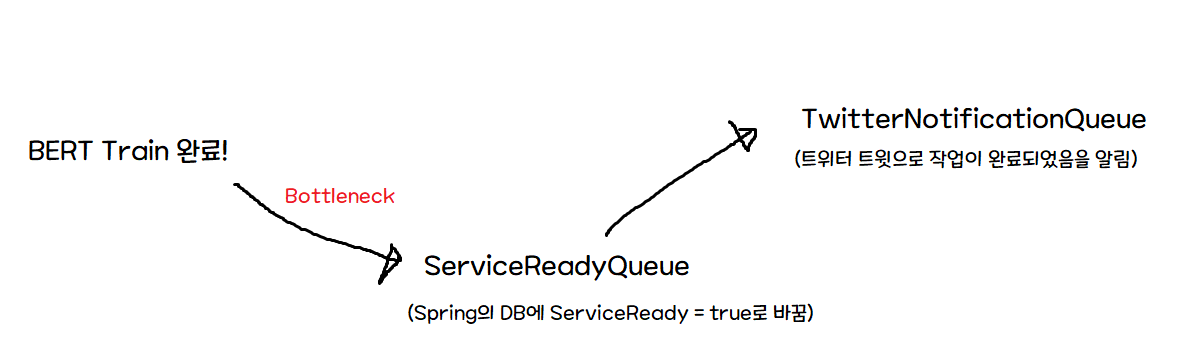
With this change, processing speed stays the same, but we avoid the critical case of the user receiving a notification but being unable to use the service.
After waiting briefly for the DB writes to finish (for the backlog to clear), I restored the login/signup buttons.
After that, things worked as expected. The bottleneck itself wasn’t resolved, but at least we avoided the critical error of a user who came after seeing a completion notification not being able to use the service for tens of minutes.
While monitoring and analyzing the cause, I noticed that message throughput was fixed at a maximum of 10. Looking into it, I found this issue on spring-cloud-aws. To summarize: it can only process 10 messages at a time, and there’s a problem where it operates synchronously, not asynchronously.
Looking at another currently-open issue , this problem requires major refactoring and is scheduled to be fixed in 3.0.0. So in conclusion…
Ah… so a hotfix is going to be tough…
In conclusion, the bottleneck itself can’t be solved easily — fixing it would require either rewriting Spring’s job in a serverless architecture, or doing a massive overhaul (…) of the library dependencies. Either way, it’s not something for today after launching, so I decided to do more monitoring.
Whoops!
This time, messages started piling up in another queue. The queue that scrapes 3,200 tweets. I jumped into monitoring right away, and saw the Lambda function handling that queue had its error rate climb to 100%.
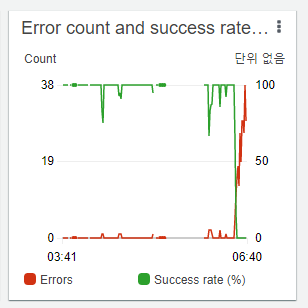
This is obviously an API limit!
I went into CloudWatch, opened the logs for that Lambda function, and sure enough.

Yep, API limit!
I didn’t know what kind of limit it was
(Twitter has all sorts of limits — user limits, app limits, 15-minute limits, daily limits, monthly limits…)
but it was obvious I had to remove the signup button (…)
After removing the signup button and posting a related notice on Twitter, three stormy hours had passed.
Since I’d hit the daily limit and there was nothing more I could do (…), I decided to do a service post-mortem and leave a record — which is what I’m writing right now.
5. Conclusion and Reflection
Ah… I had no idea SQS -> Spring would be the bottleneck, and I think this was the first time I experienced that panic state when traffic I’d always dreamed of suddenly comes flooding in and the server can’t handle it.
Especially since I built the entire service myself (…), I think I found the failure points fast, but the hardest part was figuring out how to fix a service while it’s live? what side effects might occur? and so on.
Especially in cases like the one in the middle, “a critical service failure (notification sent but execution unavailable)” — having to fix it quickly on a live server while not knowing what side effects hastily-written code might cause was the most psychologically taxing and nerve-wracking moment.
Honestly, the biggest takeaway was
Ahhh, this is why people keep saying automated tests, automated tests… If I had a bunch of tests, even if a similar situation came up, I could fix things with much greater peace of mind.
That’s what I was thinking.
And there was an unintended way I really benefited from AWS (?)
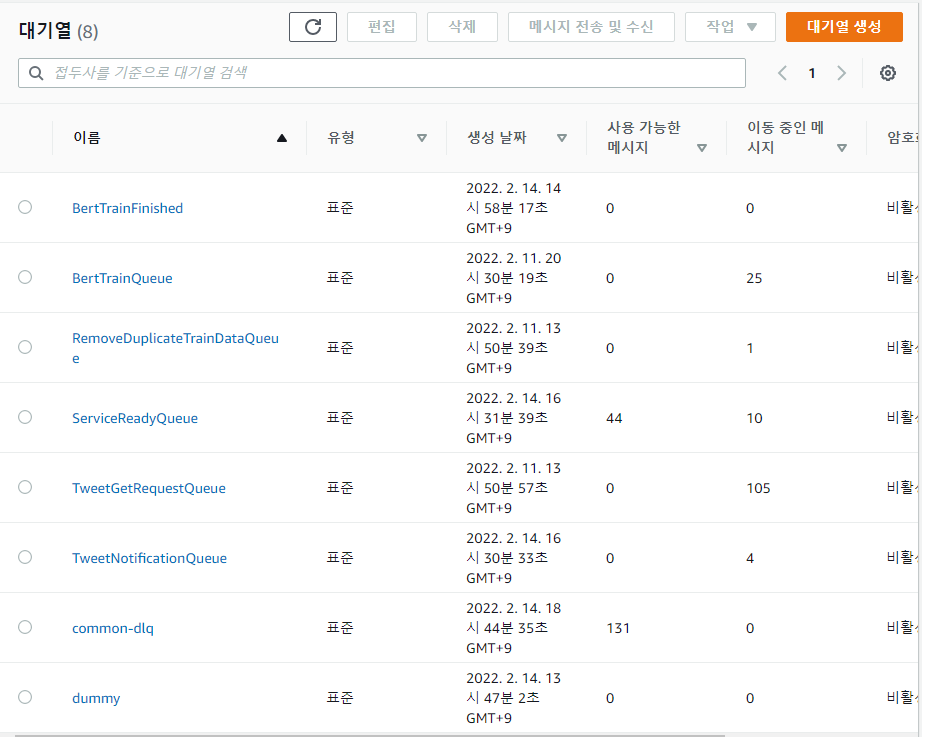
- Using a queue-based architecture made it quick to find which part was bottlenecking and where errors were occurring. If I hadn’t used SQS, finding the bottleneck would have taken much longer, but thanks to the queue-based architecture I could easily pinpoint where the bottleneck was.
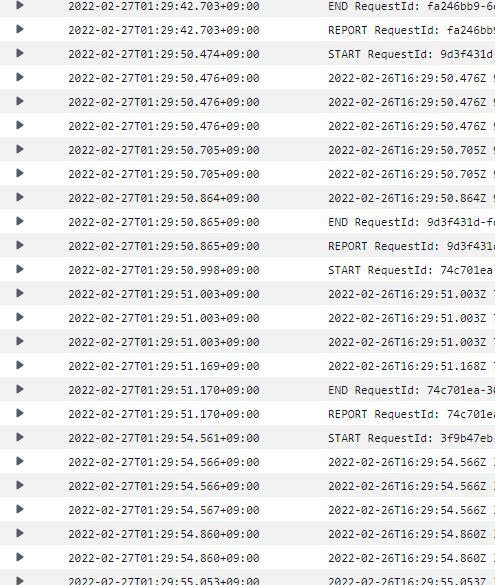
- I realized CloudWatch logs are extremely convenient and important. I’d planned to build out a monitoring system before releasing, but with a naive “let’s just release and develop more if the response is good” attitude, I went ahead and launched first. But of course problems arose, and the state-change and exception prints I’d habitually added during development were a huge help in debugging. Even if you don’t use AWS, log well and learn how to read logs…

- Always set up DLQ. Messages that the poller (service worker) tried to process N times but couldn’t due to exceptions and so on can be collected in a DLQ (Dead Letter Queue). Using DLQ, you can later send unprocessed messages back to the original queue with the DLQ redrive feature. In other words, if a request fails for some reason and isn’t processed, it goes to the DLQ, and afterward you can use DLQ redrive to resume processing from the breakpoint!
Anyway… it was really tough, but I’m relieved I somehow got through it!
If there’s anything I’ve gotten wrong or anything that could be improved, please feel free to leave your thoughts! Thank you so much for reading this long post!
Comments